Hi Joe!
I’m going to simplify your code a bit and I hope we can get to the bottom of things.
Have a look at this program:
from robot_command.rpl import *

set_units("mm", "deg")
square_1 = p[540, 0, 600, 180, 0, 0]

def main():
    notify("square 1 is " + str(square_1), warning=True)
    square_2 = square_1 * Pose(x=50)
    notify("square 2 is " + str(square_2), warning=True)
    movej(square_2)
    pass
And here’s what the pop ups tell us about square_1 and square_2:
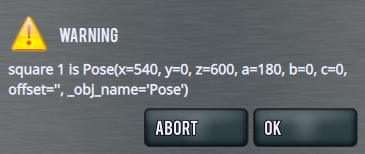
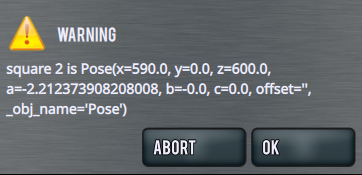
square_1 comes out as we expect.
square_2 is offset by 50mm in x, as we would expect, but there’s something going on with the A axis value that I don’t understand. @machinekoder might have some insight.
Note that square_2 does not have to be created above the main function for this code to run. You can create waypoints ‘on the fly’ in your program, and the robot will move to them successfully.
I haven’t repeated your example with a user frame active, but I don’t think there will be a difference.