When you reference the spindle nose and then set the probe length button. If you then probe the table and zero that, then put the 123 block at the same place (and probe its height) does that give the correct height for the 123?
I’m thinking you solved it.
He has to wait 20 hours to post on the forum again. Anyone else have any ideas?
I just sent this,
It looks like when you are taking part off when you measure the probe on the surface plate. I think that part is the missing 0.8667” I’m thinking that if you can zero your height gauge on the TTL holder then measure the tool from that it should match up.
1 Like
In case these help I want to drop them here. These are very helpful when getting started


2 Likes
I would set zero using the paper method and see if that gets you where you think you should be. If so at least you could make chips until you can call support and sort out this probe issue.
I have and run Both the PCNC440 and the 1100MX . I only use the X and Y axis because I never figured out the Z either but I have ran thousands of parts with no issue .
I make sure I Measure every tool with the height gauge and load them in the Offsets tab.
Just use the paper method when you load your tool and it works like a charm every time .
If you are using different tools or your ATC when building a part you should only have to use the paper method the first time assuming that you have properly measured every tool with the height gauge and loaded their measurements correctly into Offsets in Path Pilot .
3 Likes
Hello everyone,
I was able to work with Paul on a virtual call today and we discovered that the MX3660 dip-switch settings were not correct from the factory. I understand that there were a few others on this thread having a similar issue so I wanted to make a public post that if you are having any kind of linear motion issues on a PCNC440, it might be a good idea to open the electrical cabinet and make sure that the little white switches on the three blue tabs look like this picture:
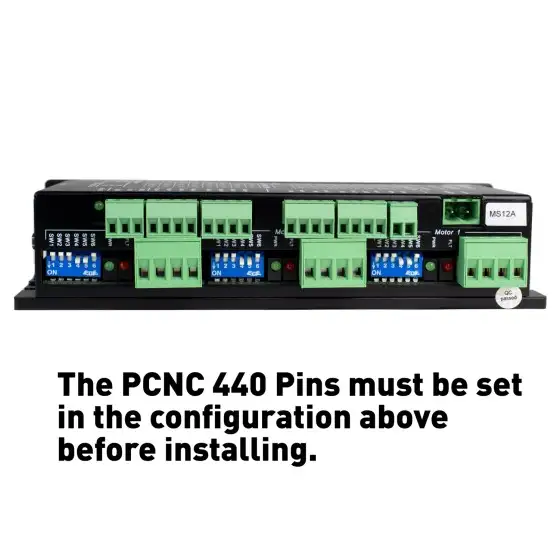
I would also like to mention that all Tormach products come with lifetime support for technical issues, if anyone ever runs into any strange behavior from their equipment and there isn’t a satisfactory answer available on the Forums, you can make a support ticket from our website at: https://tormach.atlassian.net/servicedesk/customer/portals
I promise we don’t bite 
5 Likes
As usual Tormach support swoops in and steals all the glory.