Speeds & Feeds - New Milling Machine

I am a few day off from receiving my 1500MX, so lots of questions come to mind. I primarily mill 6061 with YG1 aluminum specific tooling. I am interested in what techniques others use to establish decent speeds and feeds for their tools. I am not interested in pushing each tool to it’s max capacity, I want to achieve reasonable speeds and feeds. Here are a few approaches I have read about and experimented with:

  1. Look up the manufacturers specified surface feet per minute or whatever variables they provide and calculate the resulting theoretical best or fastest scenarios. Then start a job with the feed rate turned down to about 25% and increase it until everything looks and sounds good. Stop when it no longer looks /sounds right.
  2. Plug the manufactures tool specifications info into GWizard calculator and experiment with these figures by slowly increasing conservative/aggressive slider
  3. The Zig Zag method. Start with a conservative speed/feed from the mfg spec sheet, and sequentially increase rpm, increase chip load, increase rpm, increase chip load…. increase rpm (suggeested from Lakeshore Carbide).

Just curious what you guys have found works best for you?

Richard
You don’t want to cut to slow as some metals don’t like rubbing (stainless melts, aluminum is abrasive).
The more specific the end mill design and coating the closer you want to stick to the published feed and speed.
But that said they test on monsters that never get close to max spindle load.
If this is your first real mill it’s going to take a year to get the feel.
I always enter the manufacturer numbers but round down and then the first run I usually ease into the first cut at about 70% and then run at 95% feed most of the time.

Depends what your cutting, stainless steel heats up real fast, before you can adjust from 25% to 90% it will melt and break. Expensive carbide cutters for stainless are amazing though, they cut stainless steel like it was aluminum.

If I were you I would get lots of the cheap brand general purpose carbide cutters and work through some aluminum and mild steel. (Sometimes the dealers have clearance sales and I always buy anything marked down 80%. You’re going to break a lot the first year. Not just cutting, we have all driven the tool into the table, sideways into the work, dropped them on the floor. I’ve even broken a 0.05mm carbide drill just by sneezing.

1 Like

Thanks for your thoughts. I have guess I have been pretty lucky in the past. Only broke one endmill. My previous post was incorrect, I reduce the feed to 25% when the spindle is moving in z for the first time into the part, then I bump up to 70 or 80% asap.

Keep in mind that manufacturers are often recommending feeds and speeds for machine tools that are more substantially more rigid than our “little” Tormachs, even the 1500MX, I use the HSMAdvisor app on my PC to calculate F&S and then usually back down the feed by 25% or so. I don’t mind the occasional broken tool, but really don’t like scrapping parts.

1 Like

Thanks Mike. That is exactly what I have been doing except with GWizard. Only broke one endmill in 3 years. Guess I will keep doing the same thing.

1 Like

You’ve already gotten some great advice. Mine’s not fundamentally different, maybe just stated differently. I tell my students “Do what the nice tool company says to do and nobody gets hurt!” (I always feel like I’m being robbed when I buy/break tools.)

My only other note is that, as mentioned by Mike Henry above, quoted speed/feed info assumes “perfect world” rigid setup. Has to. They can’t imagine what you’re gonna do with their stuff, in someone else’s stuff, to who knows what material. I always try to hit the middle of the math and then optimize from there. Listen to it. If it sounds good, more of that. If it sounds bad, less. Sorry, I come from a manual machine training background before CNC’s. I have seriously thought of bringing in a musical tuning gadget and documenting the frequency of that “good” sound. Just another number to keep up with, but maybe useful to someone. Harmonics is harmonics, as they say. Harmonics Engineers say that, I guess. Have fun! Best of luck!

There has been a ton of good advice shared, so I hesitate to chime in. That being said, there were a couple of things I learned along the way that I wish I would have started with to save time. I apologize for repeating anything stated by others.

Use decent tooling. Cheap stuff is fine, but you can get good quality without breaking the bank.

Use feeds and speeds for the material and cutter combination. If you can’t find manufacturers’ recommendations (often with generic tooling), use the numbers from a reputable vendor to start. I have a few Harvey Tool PDFs that I reference for any tool I can’t get manufacturers’ numbers for. It’s better than guessing in every case. https://www.harveytool.com/resources/speeds-feeds

Keep the rigidity of your machine in mind. On the 1500 MX, I find 50-75 percent of the tooling vendors’ SFM to work as a good starting point. Just because the spindle load is 30 percent doesn’t mean the machine will like the SFM recommended by the tool maker. Once you have something working, you can get more aggressive.

Be sure to keep the chip load in the recommended range. Whatever you use for speed and feed must make this number correct. If you slow down the feed, then be sure to slow down the spindle speed as well. This might be the most significant thing impacting tool life and cut quality.

Watch the step over and depth of cut. This is where I’ve had to experiment the most, and unfortunately, it’s not something you can tune from the console with feed and speed knobs. Again, the speed and feed data from a reputable tool maker will give you an excellent place to start for width and depth of cut. Usually, it’s some percentage of the cutter diameter for radial and axial load.

Use the shortest, biggest tool you can for any operation (within the limits of the machine). While tempting to use an available tool, excessive length and undersized tools will slow you down and often give poor results.

If you must ramp into a pocket, do it as quickly as the material and tool allow. It seems defaults are often too conservative and lead to squealing. A corollary to this is always use a tool with a smaller radius than an inside corner you are machining.

I’m probably forgetting a bunch of stuff, but these items are things I wish I had been told when moving from manual machining to CNC.

Thanks for all your thoughts. Most of these comments are what I have been experimenting with. Two questions:

  1. Let’s talk 6061 aluminums (most of what I run). I use mostly YG1 bright (Uncoated) end mills circled on the attached. As a starting point, what percentage of the diameter would you use for the WOC. Typically, I use a smaller percentage on smaller tools. What do you reccomend for lets say 1/2”, 3/8”, 1/4”, 3/16” and 1/8”?
  2. If you are ramping down into a hole let’s say with a 2-degree ramp angle, do you slow down the feed rate more than for normal milling?

Thanks again for all your thoughts… Richard

00 YG1 Feeds & Speeds YG1E5981.pdf (172.5 KB)

For shorter end mills like the ones listed, I would go with about .25 x diameter maximum for radial DoC and whatever axial depth up to the flute length. Less for finishing passes, perhaps .15 x diameter maximum. More axial engagement might be a cause to reduce radial depth. All cutter sizes would get the same percentage of engagement at least in these ranges. With the 1/2 inch cutter you will find the machine struggling with full radial and axial DoC so act accordingly. Watch the spindle load on larger cutters as a guide to what limits to use.

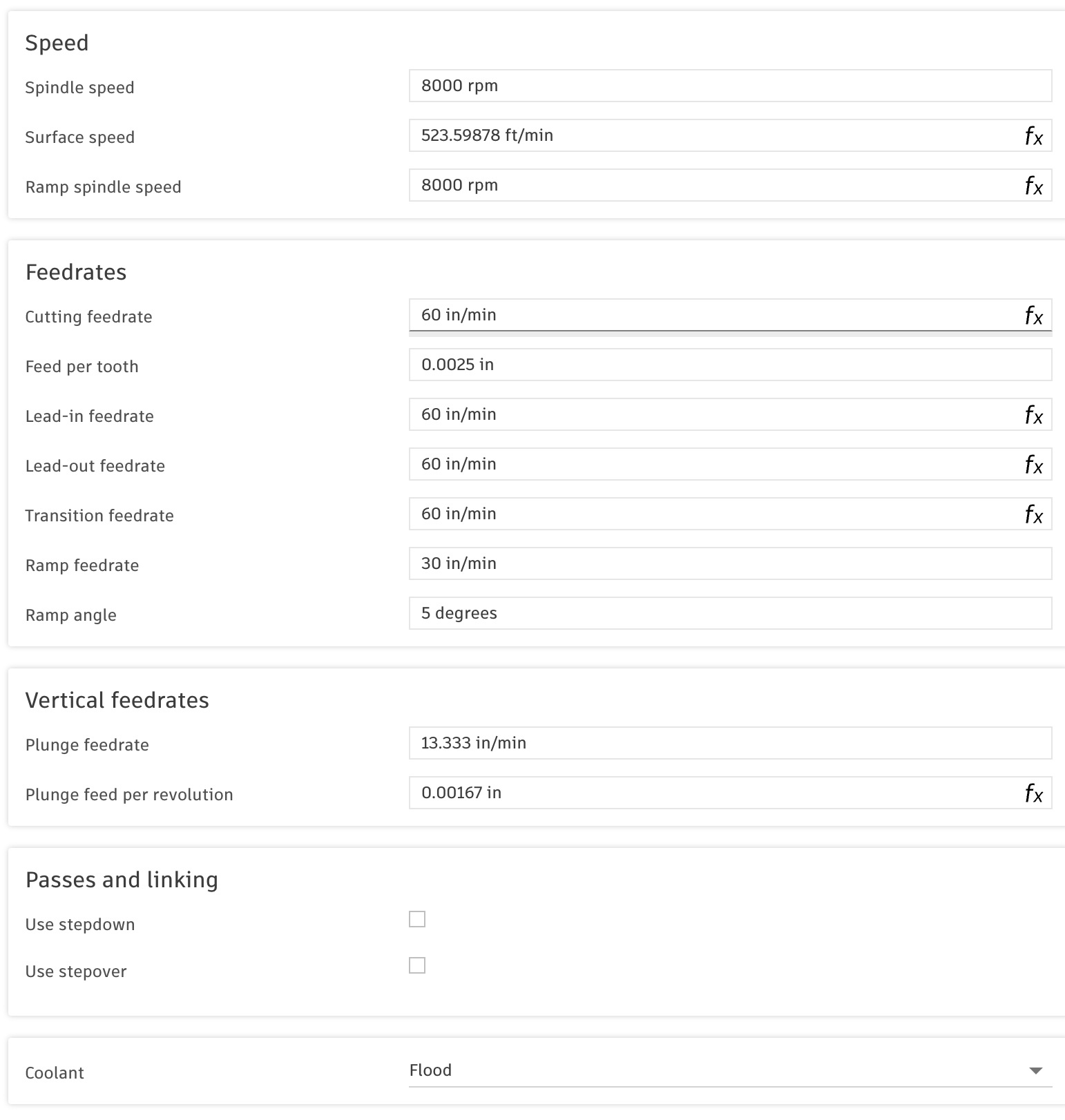
The part that I find most important is the chip load, which I didn’t see mentioned on the attached PDF. A rule of thumb I would start with for end mills like these (3 flute, short in aluminum) is 1/100th of the diameter per tooth. So a .25 inch cutter would need a chip load per tooth of about .0025. If the manufacturer lists a chip load, definitely start there. In Fusion, I usually enter in the feed per tooth and then an RPM that gives me the SFM I want. Feed is calculated automatically to keep the chip load as specified. 6061 could be anywhere from 750 to 1000 SFM depending on cutter and machine capabilities. I’ve attached an image from Fusion that shows cutting parameters for a tool I use frequently. It is the Tormach 1/4” 3 flute, part number 37370 if memory serves. I find this gives a good quality finish with no apparent machine or cutter distress. I haven’t tried to push this harder, but I would guess there is room for improvement.

I would recommend ramping more than 2 degrees or use a faster feed. My experience is that slow ramping leads to horrible noise. The image contains that information too, so you can see what I use as a default. At least for the cutter mentioned, in aluminum.

I’m always tweaking the speeds, feeds, and approaches to get a better finish, but this information might help with a sane starting point.