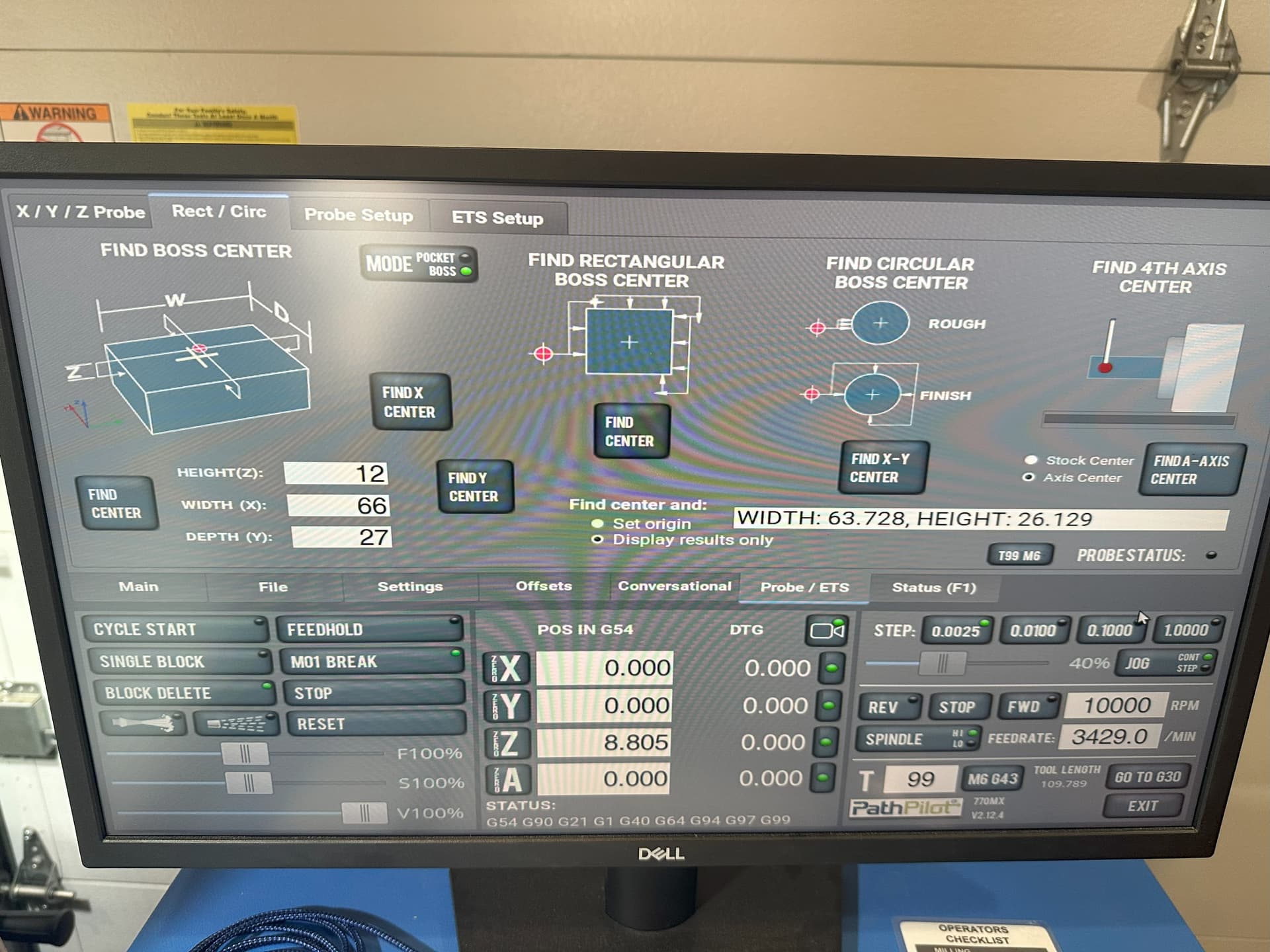
In the pathpilot find boss center probing routine page (it may be in other routines as well). The display results box shows incorrect wording.
It states the width and height, when it should display the width and depth. The values are correct, but height should read width. It can cause some confusion.
Attached is a photo. You can see my part is roughly 66mm width by 27mm depth. Yet the display output shows: width: 63.728, height: 26.129
I believe it should show: width: 63.728, depth: 26.129
Also the images is inconsistent with the wording. The image shows Z, W, D, and the wording says Height (Z), Width (X), Depth (Y).
Shouldn’t the image show Z, X, Y or H, W, D? I personally think it should show Z, X, and Y as that would be less confusion and consistent with the rest of the machine.
Probe police in the house.
Good find though. I have never actually used boss probing but now I’m curious about it.
Also which post do you use for your fusion probing because I could never get mine to work.
Haha yeah, I know, I almost didn’t post this because I thought im just being picky, but it bothers me (also how there’s a missing space between HEIGHT and Z), and I just posted 3 other topics for serious bugs in probing.
No, I have not been able to get probing to work, I’m using the default post processor that I have heavily modified. I go into details all the bugs and issues with probing in my other post if you’re interested in knowing more: