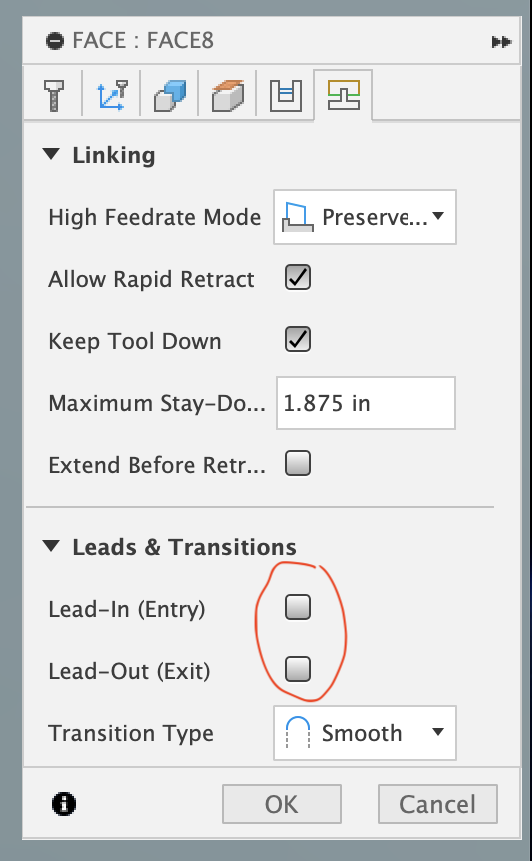
I’ve been meaning to share this in case anyone else has run across the problem. I had a heck of time trying to find the explanation on the web and actually found the solution through trial and error.
In all facing operations generated through Fusion CAM I noticed a very subtle drift in Z on the mill. It was almost unnoticeable but in certain situations would leave slight ridges at path boundaries. The PathPilot interface on the machine would show a gradual change in Z height over inches across a face and indeed the G code included very minor Z changed instructions. The height changes were generally very small, on the order of .0001 - .0005 inches. It turns out that by default Fusion includes lead in and lead out on facing operations. I wouldn’t expect that to affect the height of a facing operation but sure enough disabling lead in and out fixed the CAM output.
Hopefully if anyone else runs into the same issue this will save them a bit of time and hair pulling.
2 Likes
Jon,
I see other possible reasons for your problem
idk how big your part is, but you have maximum stay-down set to 1.875
I set this much longer than my part
also you did not check Extend Before Retract - which in line with more Max stay-down
would solve the problem
other solutions can be found on the Passes Tab
using Pass Extension or Stock offset will also solve your issue
With my 2" face mill I use a 0.200 Vertical lead-in and lead-out, and have no issues
but really that has no affect since the face mill is at the correct height before contacting the stock on the lead-in or and exiting the stock on the lead-out
but you made it work - lots of ways to skin the cat in CAM
Ed
I had the same problem earlier and it came from the smoothing option in the post processor. Set it to “fine finishing” solved it for me.
It drifts because the controller tries to smooth out the moves, blending the long facing move with the lead in/out, causing few microns/tenths of depth changes as it face across the part nearing the lead out.
Also this happened only on the 1500MX with servos, but not on my PCNC770 with steppers, so it bugged me for a while before I figured out the root cause.
1 Like
Thanks for the response. This is exactly what I was seeing and your explanation clears things up. I hope this thread helps anyone else who might run into this in the future avoid the time sink it can become.
In most cases the lead in and lead out don’t matter because the tool enters the part at the proper height and stays there for the duration of the pass. It is nice to know the cause and potentially more proper solution is adjusting the smoothing option to resolve the post processor issue. Maybe someone will fix up the post processor to be a bit more intelligent at some point.
Thanks again!