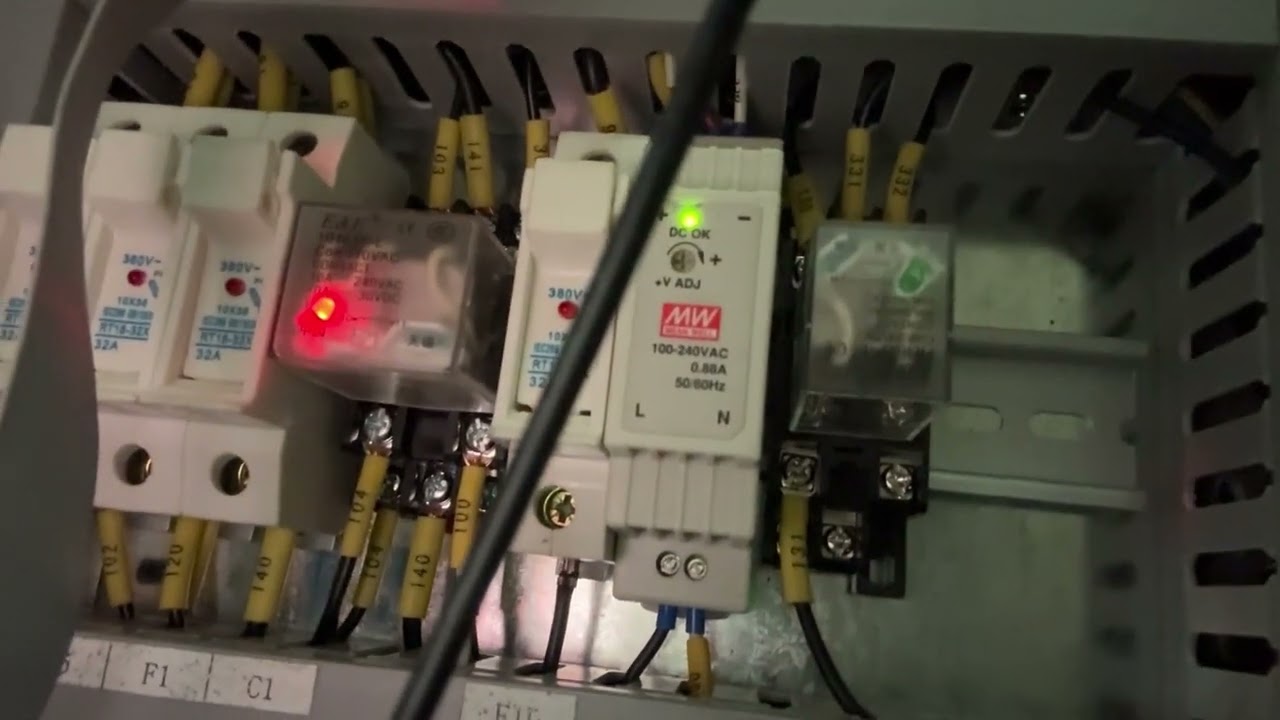
Symptoms
PathPilot boots normally.
The machine successfully transitions to Machine Ready.
PathPilot correctly detects e-stop status.
However:
No X/Y/Z axis movement.
No spindle operation.
No coolant operation.
Coolant relay never actuates.
What I’ve checked:
Verified the E-stop circuit is functioning correctly.
Verified C1 energizes (red LED illuminates and remains on)
Reseated the DB25 cable and checked for defects
DRO increments normally when jogging/referencing (commands register software-side, no physical motion)
Ordered power cycle performed (mill + controller), no change
Fuse bank verified good (F1/F3/F6/F10)
BLDC spindle drive is powered on
No error messages are displayed in PathPilot
Since you have reseated the serial cable. You could also try and verify the terminal block wires are tight. Literally put a screwdriver on everyone and check they are tight.
Working in an industrial environment most of my life you would be surprised how often reseating cables and tightening terminal block lugs actually works when weird stuff happens. The slight vibration over time can cause things to loosen up. After that its a hardware troubleshooting kinda game.
The first thing you do in the video looks like you press the eStop button in. Is that right?
The e-stops on my machines are pulled outward for operation so its easy to smack down in case of emergency. Yours may be wired backwards if it needs to be in.
FWIW, Startup sequence for my 1100MX is power on, wait for PP to boot, pull up eStop button, press the physical reset button (makes a clunk), wait a couple seconds, press reset in PP (makes a click).
E-stop is pull out to set and push to stop on my 440 and all machines I’ve seen…so, something not right with that…
You didn’t provide test results of:
110V voltage input at the 24V and 48V power supplies
appropriate DC voltage out of each of them
It sounds like they aren’t getting 110V if you have no motion or coolant.
Yes, there should be a noticeable sound when the machine is enabled with the push button switch actually makes the contactor to close the contacts and provide high voltage to downstream components.
Yes I did start by hitting the estop, but mine operates like yours, it won’t run pushed in. I was just demonstrating the issue. In the out position it operates, in the in position it stops for safety. I did the sequence exactly like yours to no avail, and I don’t hear any sound when I reset in Pathpilot. I only use the machine certain times of the year and it’s been a while, but I think that’s what I’m missing. First of all the reset sounds weak from the reset button, and there is no sound at all from resetting in Pathpilot.
The estop on my machine operates normally, the voice over might make it seem like things are in a different order just because I can’t time my talking perfectly with what I’m doing, but you can see the reset LED turn off when I press it in, then off camera I pulled it out and reset it.
As for voltages, the 24vdc power supply seems to be functioning, I get 120vac in and 24vdc out. I did not check the 48vdc power supply directly, but the fan is running (which is 48vdc) so it seems to be okay. Any other ideas?
Funny, I have also worked in industrial environments most of my career (not life, yet). The machine was working perfectly fine last week, I turned it on and ran the spindle just to exercise it, I turned on the mister so it doesn’t get clogged, and I jogged the axis just to move them around. Yes I agree vibration can cause electrical issues in these machines, it seems a little less likely given the circumstances but I will try tightening all the terminals.
I was following on Roy’s comments on estop and what I saw documented as tested (had a few mins to comment on those, didn’t get to the video).
You might want to contact tech support and open a ticket….
If you have a fan spinning, then it should have 48V supply but I’ve had voltage on that supply but no voltage at the individual component that needed it (my ATC control board went silly and eventually got it to reset after following procedures for it). I’d still want to confirm the MX3660 is getting voltage at the designated supply terminals before assuming it is.
Have you seen this page?
PP display moving but no motion is as if you have a PP controller virtual instance on PP Hub.
Do you have a probe or ETS? Do those show as tripped? What about limit switches?
This looks like a great reference and I will go through it. I was looking at the electrical drawings by themselves which was useful, but the explainer helps a lot. I did open a ticket with support, but I was hoping the wisdom of the crowds could help out here too lol. I will go through the content of the video and report back when I can, might be tomorrow since I have work in a couple of hours.
15VDC across 304/303 on the C1 when machine IS NOT ready.
This seems strange because I only know of a 24VDC PSU and 48VDC PSU? I don’t know if this is normal, I can’t find where 303/304 originate in the electrical drawing, so I don’t know what the expected voltage is.
edit:
Oh wait, they originate from the MX3660 controller.
I’m going to try the more advanced communication troubleshooting at the bottom of the page you linked.