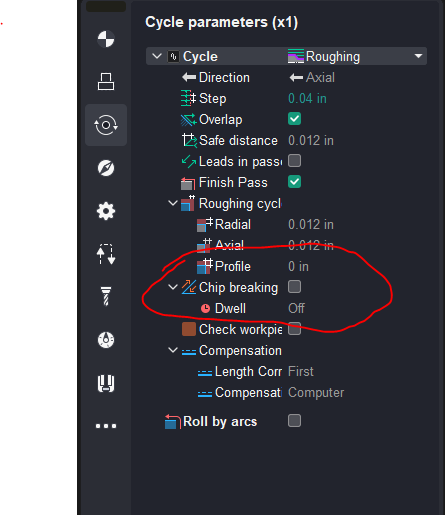
Noticed this was not in their manual and figured I would post a note showing this feature I find very helpful when running aluminum in a lathe. Ency added a chip break option for the lathe profile cycle.
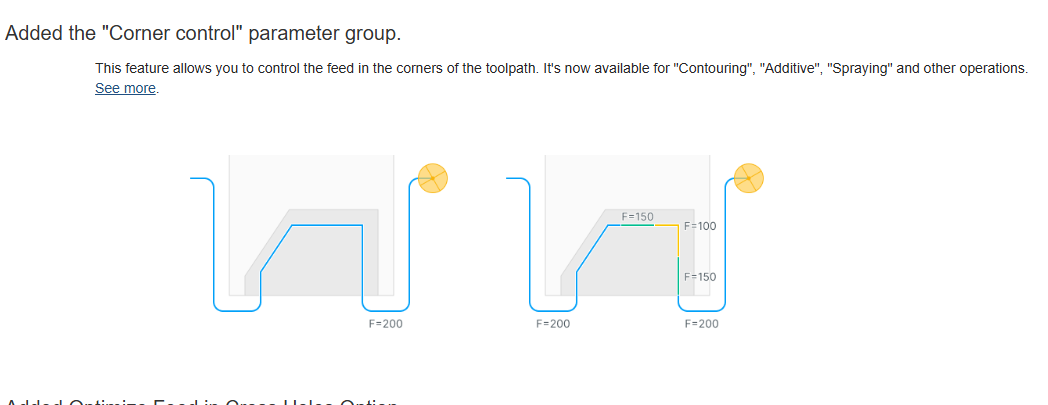
Another very nice cam option I found that has been needed for many years that helps cam setups for a 24r router is a way to control feed speed when approaching corners. Router setups can be a straight forward to setup with cookie cutter type tool paths but corner feed speed makes this a problem. This is part of the manual but I decided to add note about it because it’s a great feature.
Hope this is found useful to cam users
2 Likes
Yours is the first post that I’ve seen by an EncyCAM user. I’ve got it installed but have yet to use it as I finish up some older projects that were using SpruCAM. If you’ve tried older SprutCAM proects in EncyCAM can you comment on how painless (or painful) the experience was?
The program is nice to use, you can work on multiple projects using multiple machines all on different window tabs. I see no problems overall with older projects. I have used fixtures over the years in setups that Sprutcam changed and also ency is the same. No big deal they work ok as is or you can change to new method for defining fixtures in the machining model. Getting it to find all the correct post processors was and always has been a little confusing. Best I can see they fixed a number of tool definition problems that would pop up in one version and disappear in the next. “arbor saws and gear cutters” to be specific.
I’m in the process of making new file templates preset with the most used operations all with preset tools and ready to load models into for the mill, router and Lathe.
I noticed if you load an old program with older operations not all of the newer setting show up. If you create a new operation directly from menu from scratch the new setting are available. “lathe chip break” so far, does not show up on old programs, but if you setup same operation new it does. TBH this is all normal software stuff.
All that said I always keep a couple of old versions of sprutcam installed for legacy needs.
Also I use a workstation computer with a core I9, 128 mb memory, m2 drives and a nvidia 4060 ti gfx card. The more computer the better experience you will have with programs like this.
Edit. I did notice a difference in the the machine definition for the 24r router. Older versions I could run tool paths the last few inches of travel off the end of the machine “Apron” This version appears to not like those setups and I will need to change something.
Thanks Lane - it’s good to know that EncyCAM usually reads SprutCAM files as I’ve had occasional problems with older SC files in a newer SC version. Perhaps due to minor updates in operation parameters between versions. I, too, keep the last few versions of SprutCAM on the PC. Ditto on the PC; I use an HP workstation with an RTX video card, though both are getting a bit long in the tooth these days.
The ability to work in multiple windows will be welcome as I am frequently working on projects with design tweaks that will result in differeng feature dimensions/locations. It will be handy to call up an old version in one window to check and adjust criteria or feature selection for the new part version in another window.
1 Like