In Tormach conversational drill/tap screen, is there a way to repeat location on x or y chart without typing each line?
As example drilling 100 holes spaced .5 inches apart. 10 rows of 10 holes in square plate.
Are you handy with excel or similar programs?
If so, you can add holes with a little bit of hacking around.
CAUTION, BE CAREFUL WITH THE FOLLOWING INFO
When you post a drill Op from conversational you get something like this:
(----- Start of G-code -----)
()G17 G90 (XY Plane, Absolute Distance Mode)
G64 P 0.0050 Q 0.0000 (Path Blending)
G20 (units in inches)
G54 (Set Work Offset)G30 (Go to preset G30 location)
(Drilling)
T1 M6 G43 H1S 2840 (RPM)
M8 (Flood Coolant ON)
M3 (Spindle ON, Forward)
F 6.5 (Z Feed, inches/minute)G0 X 1.0000 Y 2.0000 (Hole 1 of 3)
G0 Z 0.5000 (Z Clear)
G90 G98 (Absolute Distance Mode, Canned return to Z or R)
G83 Z -3.0000 R -2.0000 Q 0.2500 (Canned Peck Drill)
X 2.0000 Y 4.0000 (Hole 2)
X 3.0000 Y 6.0000 (Hole 3)G80 (Cancel canned cycle)
G0 Z 0.5000
M9 (All Coolant Off)
M5 (Spindle OFF)G30 Z 0.5 (Go in Z only to preset G30 location)
G30 (Go to preset G30 location)
()
(----- End of Pattern Drill -----)
Since the G83 is a canned cycle, you can add your own drill locations in here.
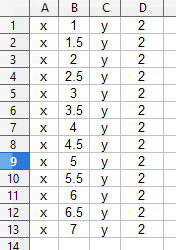
In your spreadsheet program of choice make a table that looks similar to this:
*note that for the X value column I wrote a simple formula to build a 0.5” grid
In the E column I used the Concatenate() function.
=CONCATENATE(A1;" “;B1;” “;C1;” ";D1)
I am using OpenOffice Calc so the formula and function might be a little different depending on the program you are using. I also added “ “ in between each column to account for the spaces needed in the string.
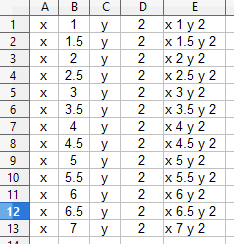
Then I copied the E column and pasted it into the drill.nc file I created, underneath the G83 cycle. Note that the first hole needs to be addressed as well and it is about the canned cycle line.
(----- Start of G-code -----)
()G17 G90 (XY Plane, Absolute Distance Mode)
G64 P 0.0050 Q 0.0000 (Path Blending)
G20 (units in inches)
G54 (Set Work Offset)G30 (Go to preset G30 location)
(Drilling)
T1 M6 G43 H1S 2840 (RPM)
M8 (Flood Coolant ON)
M3 (Spindle ON, Forward)
F 6.5 (Z Feed, inches/minute)G0 X 1.0000 Y 2.0000 (Hole 1 of 3)
G0 Z 0.5000 (Z Clear)
G90 G98 (Absolute Distance Mode, Canned return to Z or R)
G83 Z -3.0000 R -2.0000 Q 0.2500 (Canned Peck Drill)
x 1 y 2
x 1.5 y 2
x 2 y 2
x 2.5 y 2
x 3 y 2
x 3.5 y 2
x 4 y 2
x 4.5 y 2
x 5 y 2
x 5.5 y 2
x 6 y 2
x 6.5 y 2
x 7 y 2G80 (Cancel canned cycle)
G0 Z 0.5000
M9 (All Coolant Off)
M5 (Spindle OFF)G30 Z 0.5 (Go in Z only to preset G30 location)
G30 (Go to preset G30 location)
()
(----- End of Pattern Drill -----)M30 (End of Program)
now when I load this program I can see all of my holes.
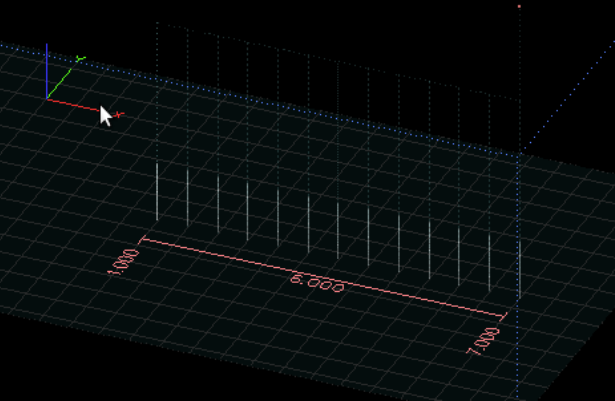
Be careful when doing this and I suggest running it without a tool first just to make sure nothing is a miss.
1 Like